| 일 | 월 | 화 | 수 | 목 | 금 | 토 |
|---|---|---|---|---|---|---|
| 1 | 2 | 3 | 4 | 5 | 6 | 7 |
| 8 | 9 | 10 | 11 | 12 | 13 | 14 |
| 15 | 16 | 17 | 18 | 19 | 20 | 21 |
| 22 | 23 | 24 | 25 | 26 | 27 | 28 |
- 서버 컴포넌트
- 끝까지 잘 마무리하기
- AJAX
- js
- git flow start
- Next.js
- Mac
- git flow finish
- 바닐라JS
- 힘들었던 한주
- TS
- 다시 홧팅
- jQuery
- 차이점
- 공부할 거 넘많다~
- JavaScript
- 책으론 원리만
- 실무는 공식문서로
- git
- javascript30
- Main
- 백준
- axios
- 클라이언트 컴포넌트
- freecodecamp
- CSS
- 개발일지
- api 라우트
- fetch pull 차이
- HTML
- Today
- Total
다다의 개발일지 6v6
[HTML & CSS] Learn CSS Colors by Building a Set of Colored Markers - rgb , #RRGGBB, hsl 함수 이용해서 여러 색깔 만들기 실험 본문
[HTML & CSS] Learn CSS Colors by Building a Set of Colored Markers - rgb , #RRGGBB, hsl 함수 이용해서 여러 색깔 만들기 실험
dev6v6 2025. 2. 12. 18:14https://www.freecodecamp.org/learn/2022/responsive-web-design/learn-css-colors-by-building-a-set-of-colored-markers/step-1
www.freecodecamp.org
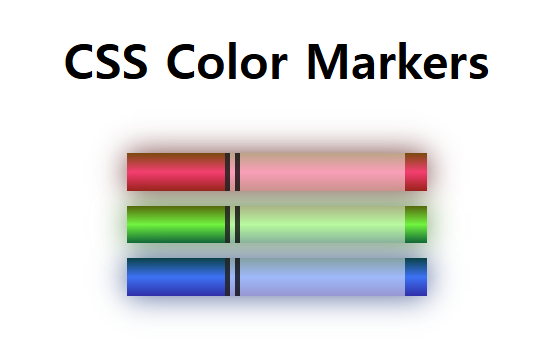
이번 프로젝트는 결과보단 과정(계속 색 섞어보면서 실험해봄)이 더 중요함!
In this project, you'll work with the RGB model. This means that colors begin as black, and change as different levels of red, green, and blue are introduced.
-> RGB 모델을 이용할 건데 얘는 검정에서 출발해서 빨 초 파를 얼마나 섞냐에 따라 색이 변하는 방식이다! 그래서 000이 검정 fff가 하얀색이다!
우리는 CSS에 있는 rgb와 rgba함수를 이용해서 확인할 것이다!
rgb(red, green, blue); /* 각 value는 0~255 */
rgba(red, green, blue, 투명도); /* 투명도는 0 ~ 1.0 */
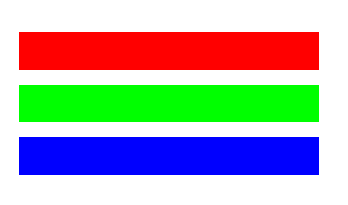
Primary Colors
.one {
  background-color: rgb(255, 0, 0);
}

.two {
  background-color: rgb(0, 255, 0);
}

.three {
  background-color: rgb(0, 0, 255);
}
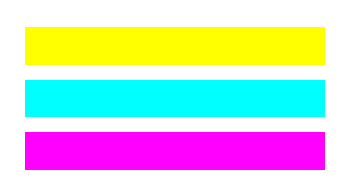
Secondary Colors
.one {
  background-color: rgb(255, 255, 0);
}

.two {
  background-color: rgb(0, 255, 255);
}

.three {
  background-color: rgb(255, 0, 255);
}
Tertiary colors -> primary + secondary
.one {
  background-color: rgb(255, 127, 0); 	/* orange = red + yellow */
}

.two {
  background-color: rgb(0, 255, 127); 	/* spring green = cyan + green */
}

.three {
  background-color: rgb(127, 0, 255); 	/* violet = magenta + blue */
}
to create orange, you had to increase the intensity of red and decrease the intensity of the green rgb values. This is because orange is the combination of red and yellow.
-> orange색을 만들려면 빨강은 올리고 초록은 내려야 한다. 왜냐면 orange = red + yellow이니까
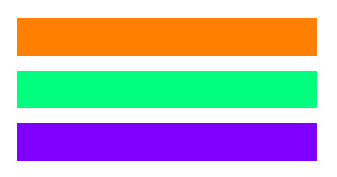
three more tertiary colors:
.one {
  background-color: rgb(127, 255, 0); 	/* chartreuse green = green + yellow */
}

.two {
  background-color: rgb(0, 127, 255); 	/* azure = blue + cyan */
}

.three {
  background-color: rgb(255, 0, 127); 	/* rose = red + magenta */
}
Hex color values start with a # character and take six characters from 0-9 and A-F. The first pair of characters represent red, the second pair represent green, and the third pair represent blue.
-> 16진수 색상 값은 #FF0000 -> RED : FF/00/00 rgb(255, 0, 0) 와 같음
-> 127은 7F로 표현하면 됨.
The HSL color model -> hsl( 각도, 채도%, 명도% );
The HSL color model, or hue, saturation, and lightness, is another way to represent colors.
The CSS hsl function accepts 3 values: a number from 0 to 360 for hue, a percentage from 0 to 100 for saturation, and a percentage from 0 to 100 for lightness.
If you imagine a color wheel, the hue red is at 0 degrees, green is at 120 degrees, and blue is at 240 degrees.
Saturation is the intensity of a color from 0%, or gray, to 100% for pure color. You must add the percent sign % to the saturation and lightness values.
Lightness is how bright a color appears, from 0%, or complete black, to 100%, complete white, with 50% being neutral.
In the .blue CSS rule, use the hsl function to change the background-color property to pure blue. Set the hue to 240, the saturation to 100%, and the lightness to 50%.
-> hsl( 각도 0도: 빨강, 120도: 초록, 240도: 파랑 , 채도% , 명도%);
예시 ) 파랑 : hsl (240, 100%, 50%);
linear-gradient( 각도 , 출발 색1, 색2, ..., 도착 색); -> 최소 2개의 색 필요
.rainbow {
  background: linear-gradient(90deg, rgb(255, 0, 0),rgb(255, 255, 0), rgb(0, 175, 0), rgb(0, 0, 255), rgb(175, 0, 255));
}
각도는 180도 기본 위에서 아래로가 기본 값임.
색 뒤에 %를 붙이면 색 위치(color-stops)를 설정할 수 있음.
-> 0%가 제일 왼쪽, 100%가 제일 오른쪽
box-shadow: offsetX offsetY ( blurRadius spreadRadius -> 생략 가능 ) color;
- offsetX: 그림자의 가로 방향 위치 (양수: 오른쪽 / 음수: 왼쪽)
- offsetY: 그림자의 세로 방향 위치 (양수: 아래쪽 / 음수: 위쪽)
- color: 그림자의 색상
추가 개념 (Spread Radius 포함 문법)
- blurRadius(선택적): 값이 클수록 그림자가 더 부드럽게 퍼짐
- spreadRadius(선택적): 값이 클수록 그림자가 더 크게 확장됨
index.html
<!DOCTYPE html>
<html lang="en">
  <head>
    <meta charset="utf-8">
    <meta name="viewport" content="width=device-width, initial-scale=1.0">
    <title>Colored Markers</title>
    <link rel="stylesheet" href="styles.css">
  </head>
  <body>
    <h1>CSS Color Markers</h1>
    <div class="container">
      <div class="marker red">
        <div class="cap"></div>
        <div class="sleeve"></div>
      </div>
      <div class="marker green">
        <div class="cap"></div>
        <div class="sleeve"></div>
      </div>
      <div class="marker blue">
        <div class="cap"></div>
        <div class="sleeve"></div>
      </div>
    </div>
  </body>
</html>
styles.css
h1 {
  text-align: center;
}

.container {
  background-color: rgb(255, 255, 255);
  padding: 10px 0;
}

.marker {
  width: 200px;
  height: 25px;
  margin: 10px auto;
}

.cap {
  width: 60px;
  height: 25px;
}

.sleeve {
  width: 110px;
  height: 25px;
  background-color: rgba(255, 255, 255, 0.5);
  border-left: 10px double rgba(0, 0, 0, 0.75);
}

.cap, .sleeve {
  display: inline-block;
}

.red {
  background: linear-gradient(rgb(122, 74, 14), rgb(245, 62, 113), rgb(162, 27, 27));
  box-shadow: 0 0 20px 0 rgba(83, 14, 14, 0.8);
}

.green {
  background: linear-gradient(#55680D, #71F53E, #116C31);
  box-shadow: 0 0 20px 0 #3B7E20CC;
}

.blue {
  background: linear-gradient(hsl(186, 76%, 16%), hsl(223, 90%, 60%), hsl(240, 56%, 42%));
  box-shadow: 0 0 20px 0 hsla(223, 59%, 31%, 0.8);
}
정리 ( 투명도는 생략가능-> 생략 시 rgb, hsl ) ( 예시는 반투명한 노란색)
1. rgba(red, green, blue, alpha)
background-color: rgba(255, 255, 0, 0.5); /* 노란색, 50% 투명도 */2. #RRGGBBAA (16진수 표현)
- #FFFF00 → 노란색 (Red: FF, Green: FF, Blue: 00)
- 7F → 50% 투명도 (Alpha 값, 7F = 127/255 ≈ 0.5)
background-color: #FFFF007F; /* 노란색, 50% 투명도 */3. hsla(hue, saturation, lightness, alpha)
- 60 → 색상(Hue) (0° = 빨강, 60° = 노랑, 120° = 초록)
- 100% → 채도(Saturation) (100% = 가장 선명한 색)
- 50% → 명도(Lightness) (0% = 검정, 100% = 흰색)
- 0.5 → 투명도(Alpha) (0 = 완전 투명, 1 = 불투명)
background-color: hsla(60, 100%, 50%, 0.5); /* 노란색, 50% 투명도 */
rgba(): 직관적이고 많이 쓰임
#RRGGBBAA: 짧고 간결한 표현
hsla(): 색조 조절이 필요할 때 유용


