
Notice
Recent Posts
Recent Comments
Link
| 일 | 월 | 화 | 수 | 목 | 금 | 토 |
|---|---|---|---|---|---|---|
| 1 | 2 | 3 | 4 | 5 | 6 | 7 |
| 8 | 9 | 10 | 11 | 12 | 13 | 14 |
| 15 | 16 | 17 | 18 | 19 | 20 | 21 |
| 22 | 23 | 24 | 25 | 26 | 27 | 28 |
Tags
- git flow finish
- axios
- AJAX
- Mac
- 공부할 거 넘많다~
- git flow start
- js
- fetch pull 차이
- 끝까지 잘 마무리하기
- freecodecamp
- javascript30
- Main
- 차이점
- 백준
- 실무는 공식문서로
- 서버 컴포넌트
- 힘들었던 한주
- jQuery
- HTML
- 클라이언트 컴포넌트
- Next.js
- 개발일지
- git
- JavaScript
- api 라우트
- 바닐라JS
- 책으론 원리만
- TS
- 다시 홧팅
- CSS
Archives
- Today
- Total
다다의 개발일지 6v6
[HTML & CSS] Build a Survey Form - 이제 실습이다! 직접 구현해보기 본문
https://www.freecodecamp.org/learn/2022/responsive-web-design/build-a-survey-form-project/build-a-survey-form
www.freecodecamp.org
Objective:
Build an app that is functionally similar to https://survey-form.freecodecamp.rocks. Do not copy this demo project. -> 참고만 하고 그대로 따라하지 말라고 한다ㅏㅏ 오케~
하지만 미션이 있다!
꼭 담고 있어야 할 것들:
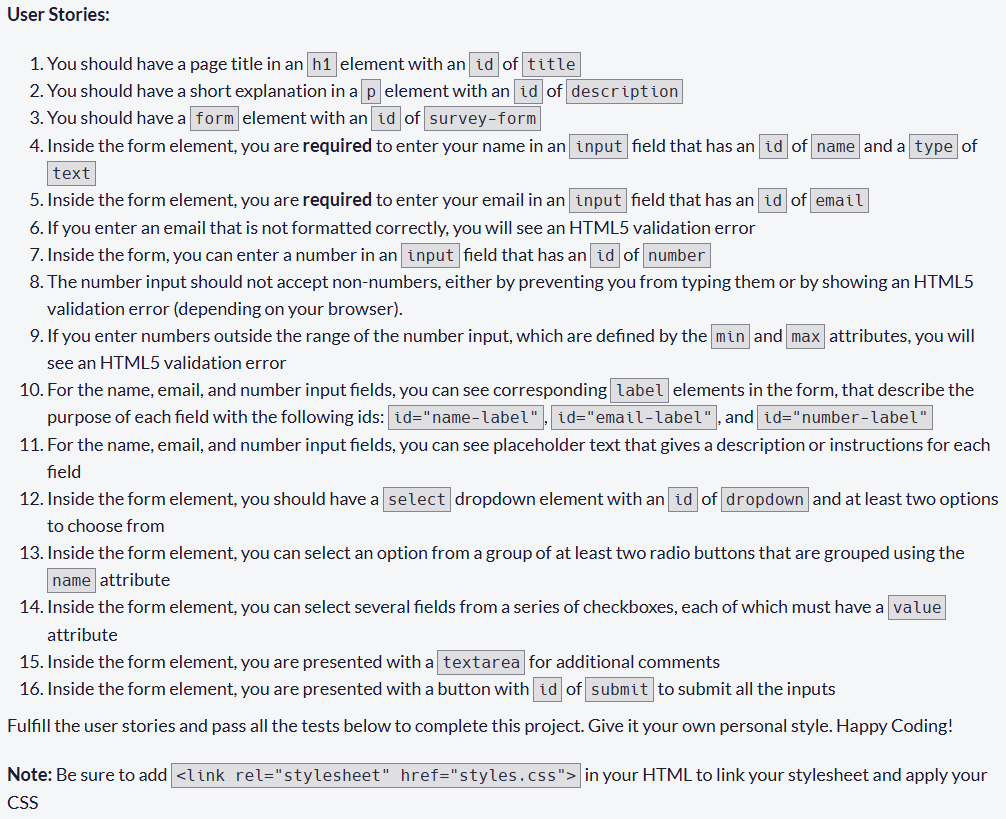
초벌 ( Test 44개 중 35개 통과)
<!DOCTYPE html>
<html lang="en">
  <head>
    <meta charset="utf-8">
    <meta name="viewport" content="width=device-width, initial-scale=1.0">
    <title>
      Dada's Friend Application Form
    </title>
    <link rel="stylesheet" href="styles.css">
  </head>
  <body>
    <h1 id="title">Make friends with dada</h1>
    <p id="description">Please tell me who you are</p>
    <form id="survey-form">
      <fieldset class="who">
      	<legend>Who you are ?</legend>
      	<label id="name-label">What's your name?
        	<input id="name" type="text" placeholder="dada kim" required>
      	</label>
      	<label id="email-label">What's your email?
        	<input id="email" type="email" placeholder="dada@dadaworld.com" required>
      	</label>
      	<label for="age" id="number-label">What's your age? </label>
      	<input id="age" type="number" min="13" max="99" placeholder="13~99" required>
      </fieldset>

      <label id="dropdown"> Why do you want to be friends with me ?

          <select name="reason">
            <option value="">(why ~? ^^)</option>
            <option value="like">I am curious about dada</option>

            <option value="like">I like dada ~</option>
            <option value="love">I love dada ~!</option>
          </select>
      </label>
      <fieldset>
        <legend>Subscription</legend>
      	<label>
        	<input type="radio" name="subscription" value="yes"> I am subscribed to the dada's blog ^^
      	</label>
      	<label>
        	<input type="radio" name="subscription" value="no"> I am Not subscribed to the dada's blog...ToT
      	</label>
      </fieldset>
      <label> Things you want to see more on Dada's blog:
        <textarea rows="3" cols="50" placeholder="I hope..."></textarea>
      </label>
      <input id="submit" type="submit" value="다다에게 전달하기">
    </form>
  </body>
</html>
해결해보자!!


원인, 해결:
음 이건 type이 number인 input을 나이로 이용해서 내가 id="age"로 해버려서 나온 문제!! id="number" 로 바꿔주면 바로 해결~~ id 바꾸면 label의 for속성도 바꿔줘야함!
<label for="number" id="number-label">What's your age? </label>
<input id="number" type="number" min="13" max="99" placeholder="13~99" required>

원인, 해결:
이건 select 요소 id를 dropdown으로 했어야 하는데 select의 label에 해서 .. ㅎ

원인, 해결:
checkbox를 안넣었다ㅏ! 음 뭘로 넣지 ,, 중복 가능한 걸로 하고 싶은데
다다와 겹치는 취미로 해야겠다.
      <fieldset>
        <legend>Things we <strong>like together</strong></legend>
        <label class="inline">
          <input type="checkbox" name="hobby" value="yoga"> yoga
        </label>
        <label class="inline">
          <input type="checkbox" name="hobby" value="running"> running
        </label>
        <label class="inline">
          <input type="checkbox" name="hobby" value="diy"> DIY (making something)
        </label>
        <label class="inline">
          <input type="checkbox" name="hobby" value="baking"> baking
        </label>
        <label class="inline">
          <input type="checkbox" name="hobby" value="coding"> coding
        </label>
      </fieldset>
코드 추가~!
테스트 통과 + 꾸미기
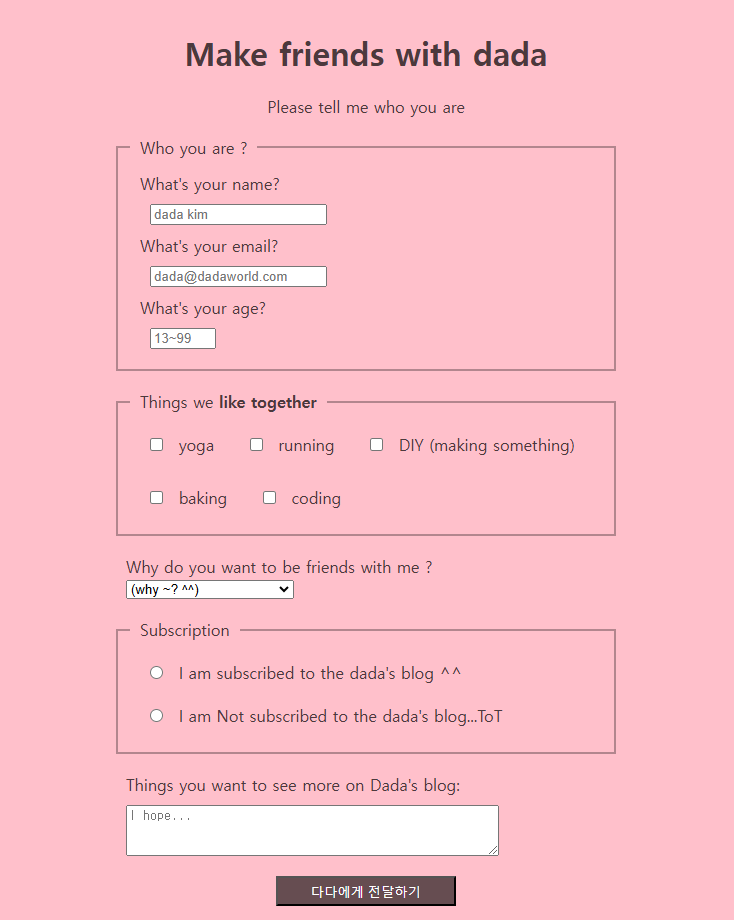
원래 css 파일 따로 만들었는데 티스토리에서 링크 연결할 수 없는 거 같아서 style 태그 안에 넣음.
HTML 삽입
Make friends with dada
Please tell me who you are
index.html
<!DOCTYPE html>
<html lang="en">
  <head>
    <meta charset="utf-8">
    <meta name="viewport" content="width=device-width, initial-scale=1.0">
    <title>
      Dada's Friend Application Form
    </title>
    <link rel="stylesheet" href="styles.css">
  </head>
  <body>
    <h1 id="title">Make friends with dada</h1>
    <p id="description">Please tell me who you are</p>
    <form id="survey-form" method="post">

      <fieldset class="who">
      	<legend>Who you are ?</legend>
      	<label id="name-label">What's your name?
        	<input id="name" type="text" placeholder="dada kim" required>
      	</label>
      	<label id="email-label">What's your email?
        	<input id="email" type="email" placeholder="dada@dadaworld.com" required>
      	</label>
      	<label id="number-label">What's your age?
      	<input id="number" type="number" min="13" max="99" placeholder="13~99" required>
        </label>
      </fieldset>
      <fieldset>
        <legend>Things we <strong>like together</strong></legend>
        <label class="inline">
          <input type="checkbox" name="hobby" value="yoga"> yoga
        </label>
        <label class="inline">
          <input type="checkbox" name="hobby" value="running"> running
        </label>
        <label class="inline">
          <input type="checkbox" name="hobby" value="diy"> DIY (making something)
        </label>
        <label class="inline">
          <input type="checkbox" name="hobby" value="baking"> baking
        </label>
        <label class="inline">
          <input type="checkbox" name="hobby" value="coding"> coding
        </label>
      </fieldset>


      <label for="dropdown"> Why do you want to be friends with me ?
        <select id="dropdown" name="reason">
          <option value="">(why ~? ^^)</option>
          <option value="like">I am curious about dada</option>

          <option value="like">I like dada ~</option>
          <option value="love">I love dada ~!</option>
        </select>
      </label>

      <fieldset>
        <legend>Subscription</legend>
      	<label>
        	<input type="radio" name="subscription" value="yes"> I am subscribed to the dada's blog ^^
      	</label>
      	<label>
        	<input type="radio" name="subscription" value="no"> I am Not subscribed to the dada's blog...ToT
      	</label>
      </fieldset>

      <label for="more"> Things you want to see more on Dada's blog:
      </label>
        <textarea id="more" rows="3" cols="50" placeholder="I hope..."></textarea>
      <div class="button">
        <input id="submit" type="submit" value="다다에게 전달하기">
      </div>
    </form>
  </body>
</html>
styles.css
body {
  padding:20px;
  background-color: pink;
  color: rgba(0, 0, 0, 0.7);
;
  min-width: 300px;
  max-width: 500px;
  width: 70%;
  margin: 0 auto;
}
h1, p {
  text-align: center;
}

label, input, textarea {
  display: block;
  margin: 10px;
}

fieldset {
  margin: 20px 0;
  border: 2px solid rgba(0, 0, 0, 0.3);
}

legend {
  padding: 0 10px;
}

input[type="radio"], input[type="checkbox"] {
  display: unset;
}

.inline {
  display: inline-block;
}

#submit {
  width: 180px;
  height: 30px;
  margin: 20px auto;
  background-color: rgba(0, 0, 0, 0.6);
  color: white;
}'Frontend > HTML, CSS' 카테고리의 다른 글
'Frontend/HTML, CSS' Related Articles
more


