
| 일 | 월 | 화 | 수 | 목 | 금 | 토 |
|---|---|---|---|---|---|---|
| 1 | 2 | 3 | 4 | 5 | 6 | 7 |
| 8 | 9 | 10 | 11 | 12 | 13 | 14 |
| 15 | 16 | 17 | 18 | 19 | 20 | 21 |
| 22 | 23 | 24 | 25 | 26 | 27 | 28 |
- TS
- js
- javascript30
- 백준
- freecodecamp
- 끝까지 잘 마무리하기
- git flow finish
- JavaScript
- 바닐라JS
- Next.js
- HTML
- 실무는 공식문서로
- 책으론 원리만
- CSS
- axios
- 공부할 거 넘많다~
- jQuery
- 힘들었던 한주
- Main
- git flow start
- 다시 홧팅
- 차이점
- api 라우트
- 서버 컴포넌트
- 개발일지
- 클라이언트 컴포넌트
- fetch pull 차이
- AJAX
- git
- Mac
- Today
- Total
다다의 개발일지 6v6
[HTML & CSS] Learn Basic CSS by Building a Cafe Menu - meta 태그, visited, hover, active 본문
[HTML & CSS] Learn Basic CSS by Building a Cafe Menu - meta 태그, visited, hover, active
dev6v6 2025. 2. 11. 23:30https://www.freecodecamp.org/learn/2022/responsive-web-design/learn-basic-css-by-building-a-cafe-menu/step-1
www.freecodecamp.org
CSS : Cascading Style Sheets
You have styled three elements by writing CSS inside the style tags. This works, but since there will be many more styles, it's best to put all the styles in a separate file and link to it.
CSS 를 head태그 안에 style 태그를 이용해서 써도 작동은 하지만
더 많은 스타일을 부여할 수록 코드가 길어지므로 따로 파일(styles.css)을 작성하고 link하자!
meta 태그 (HTML)
우선 meta태그는 웹페이지 상에 나타나진 않지만 설명하는 역할을 한다.
이러한 태그를 잘 작성하면 우리의 웹페이지가 훨씬 더 가치 있는 정보가 될 수 있다.
제목이 무엇인가
웹페이지의 저자는 누구인가
어떤내용을 담고 있는가에 대한 요약
검색 키워드
<meta charset =”utf-8”> → 이 문서는 utf-8으로 저장된 문서입니다.
웹브라우저가 어떤 방식으로 저장되어있는지 해석하는걸 도와줌.
<meta name=”description” content=”다다의 CSS공부”>
웹페이지에 대한 요약된 자료
검색 엔진에서 요약자료에 사용될 가능성이 높음.
<meta name=”keywords” content=”코딩, coding, html, css”>
이 웹페이지를 잘 설명하는 키워드를 설정
<meta name=”author” content=”다다”>
<meta http-equiv=”refresh” content=”30”>
자주 사용하진 않지만
30초 간격으로 자동으로 refresh됨.
모바일 지원 viewport
<meta name="viewport" content="width = device-width, initial-scale = 1.0">width = device-width
-> 홈페이지 너비를 장치 너비에 맞춘다.
initial-scale = 1.0
-> 처음 홈페이지를 로딩 했을 때 줌인 줌아웃을 하지 않은 상태로 로드한다.
디자인을 위해서 어떤 의미도 없는 태그를 사용해야 할 때가 있음.
그게 블럭이면 <div> → division
인라인이면 <span> → span (구역, 범위)
같은 tag, class, id(선택자)는 css에서 아래에다(가장 최근에 쓴) 쓸수록 더 우선순위가 높다.
Class vs Id
우선순위가 좀더 높은 id > class > tag
class나 tag보다 id가 더 위에 있어도 id가 우선순위가 더 높다!
id의 값은 중복되서는 안된다. (유일무이한 값)
주로 class를 사용함!
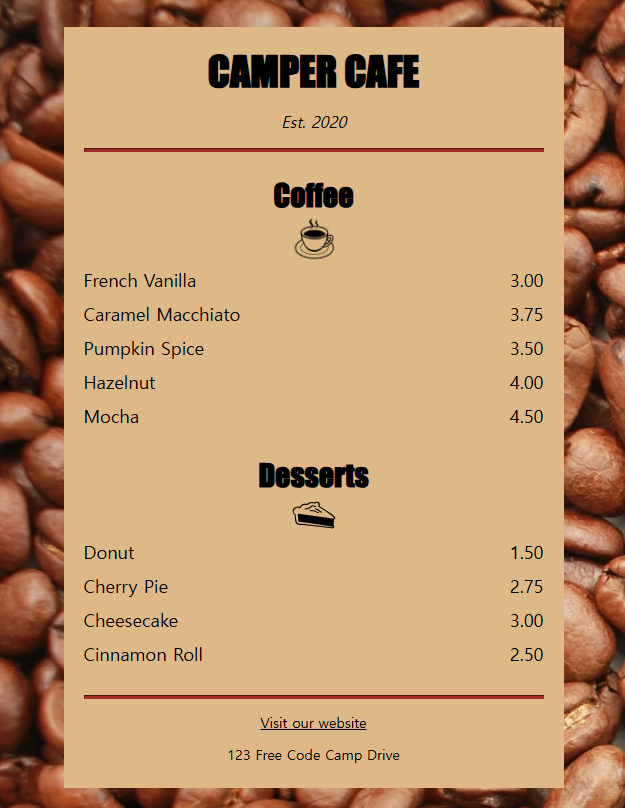
article elements commonly contain multiple elements that have related information. In this case, it will contain a coffee flavor and a price for that flavor.
-> article 요소는 주로 관련 정보를 여러개 포함한다. 여기선 커피맛과 가격
<article class="item">
<p class="flavor">French Vanilla</p><p class="price">3.00</p>
</article>
(css로 p를 inline-block으로 만들었을 때)
위의 코드에서 두 p 요소를 나란히 놓지 않으면 두 p 요소 사이에 작은 공간이 생긴다!
visited, hover, active
index.html
<!DOCTYPE html>
<html lang="en">
  <head>
    <meta charset="utf-8" />
    <meta name="viewport" content="width=device-width, initial-scale=1.0" />
    <title>Cafe Menu</title>
    <link href="styles.css" rel="stylesheet"/>
  </head>
  <body>
    <div class="menu">
      <main>
        <h1>CAMPER CAFE</h1>
        <p class="established">Est. 2020</p>
        <hr>
        <section>
          <h2>Coffee</h2>
          <img src="https://cdn.freecodecamp.org/curriculum/css-cafe/coffee.jpg" alt="coffee icon"/>
          <article class="item">
            <p class="flavor">French Vanilla</p><p class="price">3.00</p>
          </article>
          <article class="item">
            <p class="flavor">Caramel Macchiato</p><p class="price">3.75</p>
          </article>
          <article class="item">
            <p class="flavor">Pumpkin Spice</p><p class="price">3.50</p>
          </article>
          <article class="item">
            <p class="flavor">Hazelnut</p><p class="price">4.00</p>
          </article>
          <article class="item">
            <p class="flavor">Mocha</p><p class="price">4.50</p>
          </article>
        </section>
        <section>
          <h2>Desserts</h2>
          <img src="https://cdn.freecodecamp.org/curriculum/css-cafe/pie.jpg" alt="pie icon"/>
          <article class="item">
            <p class="dessert">Donut</p><p class="price">1.50</p>
          </article>
          <article class="item">
            <p class="dessert">Cherry Pie</p><p class="price">2.75</p>
          </article>
          <article class="item">
            <p class="dessert">Cheesecake</p><p class="price">3.00</p>
          </article>
          <article class="item">
            <p class="dessert">Cinnamon Roll</p><p class="price">2.50</p>
          </article>
        </section>
      </main>
      <hr class="bottom-line">
      <footer>
        <p>
          <a href="https://www.freecodecamp.org" target="_blank">Visit our website</a>
        </p>
        <p class="address">123 Free Code Camp Drive</p>
      </footer>
    </div>
  </body>
</html>
styles.css
body {
  background-image: url(https://cdn.freecodecamp.org/curriculum/css-cafe/beans.jpg);
  font-family: sans-serif;
  padding: 20px;
}

h1 {
  font-size: 40px;
  margin-top: 0;
  margin-bottom: 15px;
}

h2 {
  font-size: 30px;
}

.established {
  font-style: italic;
}

h1, h2, p {
  text-align: center;
}

.menu {
  width: 80%;
  background-color: burlywood;
  margin-left: auto;
  margin-right: auto;
  padding: 20px;
  max-width: 500px;
}

img {
  display: block;
  margin-left: auto;
  margin-right: auto;
  margin-top: -20px;
}

hr {
  height: 2px;
  background-color: brown;
  border-color: brown;
}

.bottom-line {
  margin-top: 25px;
}

h1, h2 {
  font-family: Impact, serif;
}

.item p {
  display: inline-block;
  margin-top: 5px;
  margin-bottom: 5px;
  font-size: 18px;
}

.flavor, .dessert {
  text-align: left;
  width: 75%;
}

.price {
  text-align: right;
  width: 25%;
}

/* FOOTER */

footer {
  font-size: 14px;
}

.address {
  margin-bottom: 5px;
}

a {
  color: black;
}

a:visited {
  color: black;
}

a:hover {
  color: brown;
}

a:active {
  color: brown;
}


