
Notice
Recent Posts
Recent Comments
Link
| 일 | 월 | 화 | 수 | 목 | 금 | 토 |
|---|---|---|---|---|---|---|
| 1 | 2 | 3 | 4 | 5 | 6 | 7 |
| 8 | 9 | 10 | 11 | 12 | 13 | 14 |
| 15 | 16 | 17 | 18 | 19 | 20 | 21 |
| 22 | 23 | 24 | 25 | 26 | 27 | 28 |
Tags
- 클라이언트 컴포넌트
- AJAX
- jQuery
- HTML
- 끝까지 잘 마무리하기
- CSS
- git flow start
- axios
- Next.js
- api 라우트
- 백준
- js
- 책으론 원리만
- TS
- javascript30
- 실무는 공식문서로
- 다시 홧팅
- fetch pull 차이
- 바닐라JS
- freecodecamp
- 공부할 거 넘많다~
- JavaScript
- Main
- 힘들었던 한주
- 차이점
- git flow finish
- 서버 컴포넌트
- Mac
- git
- 개발일지
Archives
- Today
- Total
다다의 개발일지 6v6
[CSS] Learn Typography by Building a Nutrition Label - text 스타일 연습 본문
Frontend/HTML, CSS
[CSS] Learn Typography by Building a Nutrition Label - text 스타일 연습
dev6v6 2025. 2. 17. 02:10https://www.freecodecamp.org/learn/2022/responsive-web-design/learn-typography-by-building-a-nutrition-label/step-1
www.freecodecamp.org
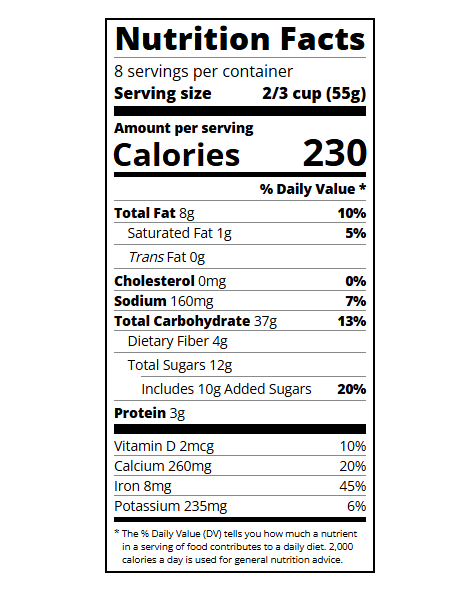
Remember that fonts with spaces in the name must be wrapped in quotes for CSS.
-> 폰트 이름에 공백이 있는 경우는 꼭 CSS용 따옴표로 감싸야 한다.!!
font-family: "Open Sans";
브라우저 개발자 도구는 border-box로 width를 계산
- .label 요소의 width: 270px;을 설정했는데, 개발자 도구로 보면 실제 너비가 288px
- 이유? CSS의 기본 box-sizing 값이 content-box이기 때문
box-sizing: border-box; 로 해결
➡ box-sizing: border-box;을 사용하면 width가 padding과 border까지 포함한 크기로 설정됨!
이제 width: 270px;이면 padding과 border를 포함해서 정확히 270px 유지됨!
:not(선택자) 이란?
➡ 특정 CSS 규칙을 "제외한" 요소들을 선택하는 가상 선택자
➡ 주어진 선택자와 일치하지 않는 요소들만 스타일을 적용
예제 코드
.daily-value p:not(.no-divider) {
  border-bottom: 1px solid #888989;
}
✅ .no-divider 클래스를 가진 p 태그 제외 하고 border 적용.
각주나 설명글(.note) 스타일 만들기
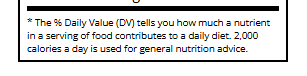
.note {
  font-size: 0.6rem;
  margin: 5px 0;
  /* padding: 0 8px;
  text-indent: -8px; */
}
여기서 저 주석을 풀어주면!
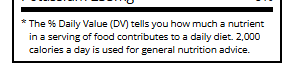
- padding: 0 8px; → 좌우로 8px 패딩 추가 (내용을 안쪽으로 밀어넣음)
- text-indent: -8px; → 첫 `줄` 들여쓰기(-8px), 즉 첫 글자를 왼쪽으로 8px 이동
index.html
<!DOCTYPE html>
<html lang="en">

<head>
  <meta charset="UTF-8">
  <title>Nutrition Label</title>
  <link href="https://fonts.googleapis.com/css?family=Open+Sans:400,700,800" rel="stylesheet">
  <link href="./styles.css" rel="stylesheet">
</head>

<body>
  <div class="label">
    <header>
      <h1 class="bold">Nutrition Facts</h1>
      <div class="divider"></div>
      <p>8 servings per container</p>
      <p class="bold">Serving size <span>2/3 cup (55g)</span></p>
    </header>
    <div class="divider large"></div>
    <div class="calories-info">
      <div class="left-container">
        <h2 class="bold small-text">Amount per serving</h2>
        <p>Calories</p>
      </div>
      <span>230</span>
    </div>
    <div class="divider medium"></div>
    <div class="daily-value small-text">
      <p class="bold right no-divider">% Daily Value *</p>
      <div class="divider"></div>
      <p><span><span class="bold">Total Fat</span> 8g</span> <span class="bold">10%</span></p>
      <p class="indent no-divider">Saturated Fat 1g <span class="bold">5%</span></p>
      <div class="divider"></div>
      <p class="indent no-divider"><span><i>Trans</i> Fat 0g</span></p>
      <div class="divider"></div>
      <p><span><span class="bold">Cholesterol</span> 0mg</span> <span class="bold">0%</span></p>
      <p><span><span class="bold">Sodium</span> 160mg</span> <span class="bold">7%</span></p>
      <p><span><span class="bold">Total Carbohydrate</span> 37g</span> <span class="bold">13%</span></p>
      <p class="indent no-divider">Dietary Fiber 4g</p>
      <div class="divider"></div>
      <p class="indent no-divider">Total Sugars 12g</p>
      <div class="divider double-indent"></div>
      <p class="double-indent no-divider">Includes 10g Added Sugars <span class="bold">20%</span></p>
      <div class="divider"></div>
      <p class="no-divider"><span><span class="bold">Protein</span> 3g</span></p>
      <div class="divider large"></div>
      <p>Vitamin D 2mcg <span>10%</span></p>
      <p>Calcium 260mg <span>20%</span></p>
      <p>Iron 8mg <span>45%</span></p>
      <p class="no-divider">Potassium 235mg <span>6%</span></p>
    </div>
    <div class="divider medium"></div>
    <p class="note">* The % Daily Value (DV) tells you how much a nutrient in a serving of food contributes to a daily
      diet. 2,000 calories a day is used for general nutrition advice.</p>
  </div>
</body>
</html>
styles.css
* {
  box-sizing: border-box;
}

html {
  font-size: 16px;
}

body {
  font-family: 'Open Sans', sans-serif;
}

.label {
  border: 2px solid black;
  width: 270px;
  margin: 20px auto;
  padding: 0 7px;
}

header h1 {
  text-align: center;
  margin: -4px 0;
  letter-spacing: 0.15px
}

p {
  margin: 0;
  display: flex;
  justify-content: space-between;
}

.divider {
  border-bottom: 1px solid #888989;
  margin: 2px 0;
}

.bold {
  font-weight: 800;
}

.large {
  height: 10px;
}

.large, .medium {
  background-color: black;
  border: 0;
}

.medium {
  height: 5px;
}

.small-text {
  font-size: 0.85rem;
}


.calories-info {
  display: flex;
  justify-content: space-between;
  align-items: flex-end;
}

.calories-info h2 {
  margin: 0;
}

.left-container p {
  margin: -5px -2px;
  font-size: 2em;
  font-weight: 700;
}

.calories-info span {
  margin: -7px -2px;
  font-size: 2.4em;
  font-weight: 700;
}

.right {
  justify-content: flex-end;
}

.indent {
  margin-left: 1em;
}

.double-indent {
  margin-left: 2em;
}

.daily-value p:not(.no-divider) {
  border-bottom: 1px solid #888989;
}

.note {
  font-size: 0.6rem;
  margin: 5px 0;
  padding: 0 8px;
  text-indent: -8px;
}'Frontend > HTML, CSS' 카테고리의 다른 글
| [CSS] Learn Accessibility by Building a Quiz - 접근성을 고려한 홈페이지 만들기 (0) | 2025.02.19 |
|---|---|
| [CSS] Learn CSS Flexbox by Building a Photo Gallery - flexbox 뽀시기 (1) | 2025.02.16 |
| [CSS] Learn the CSS Box Model by Building a Rothko Painting - 박스 모델 정리! (0) | 2025.02.15 |
| [HTML & CSS] Build a Survey Form - 이제 실습이다! 직접 구현해보기 (3) | 2025.02.13 |
| [HTML & CSS] Learn HTML Forms by Building a Registration Form (0) | 2025.02.12 |
'Frontend/HTML, CSS' Related Articles
more


